Restricting Composer plugins across your organization

This is the next post in our supply chain security series, following the supply chain security update, the Composer 2.10 release, closing Composer's download fallback paths, blocking malware downloads for every Composer version, and enforcing a safe Composer version across your organization.
Composer plugins are a powerful extension mechanism: They let packages alter and extend Composer's own behavior. They are also an easily overlooked risk in the dependency tree, because they execute code on your machine during composer install and composer update. Today we are introducing a Private Packagist setting that lets organization owners decide organization-wide, which packages are allowed to act as Composer plugins.
What are Composer plugins?
A Composer plugin is a regular Composer package that declares its type as composer-plugin in its composer.json and points to a plugin class implementing Composer\Plugin\PluginInterface:
{
    "name": "acme/my-plugin",
    "type": "composer-plugin",
    "require": {
        "composer-plugin-api": "^2.0"
    },
    "extra": {
        "class": "Acme\\MyPlugin\\MyPluginClass"
    }
}
Once Composer encounters such a plugin in your project’s dependencies, it will load and execute its plugin class as part of any Composer command. The plugin class can then manipulate Composer’s internal state and subscribe to events fired during the installation process.
Plugins are used for a wide range of legitimate purposes: framework installers that place packages into non-standard directories, automatically configure new framework modules/extensions, web asset compilers, license checkers, and more. The mechanism is widely useful, which makes it an attractive target.
Why plugins are different from regular dependencies
A regular library only runs when your application code calls into it, when its class autoloader gets registered. That gives you a window to inspect what was installed before any of its code executes: you can read the updated composer.lock, browse the contents of the vendor directory, and check what changed, all before any of it is executed.
A plugin does not give you such a window. By the time composer update or install finish, plugin code has already been executed on the developer's machine or CI runner that ran the command.
What makes this particularly risky is how easily a package can become a plugin. A package that was a perfectly ordinary library yesterday can publish a new version today that changes its type to composer-plugin. Composer prompts the developer before running a new plugin, but the prompt doesn’t look very suspicious: The package is already a trusted dependency, so one careless “yes” is enough to allow the plugin and let it execute arbitrary code on every machine that pulls in the latest version.
The intercom/intercom-php compromise
Unfortunately, this is no longer theoretical. On April 30th, 2026, the intercom/intercom-php package was compromised as part of a Mini Shai-Hulud campaign. The attackers force-pushed a malicious commit to the existing 5.0.2 git tag and changed its composer.json to register intercom/intercom-php as a Composer plugin.
Any project that ran composer update after the compromise received the malicious version, and Composer executed the attacker's code as part of the install process. The plugin then executed a credential-harvesting script that targeted cloud provider credentials (AWS, GCP, Azure), .env files, SSH keys and local configuration files.
This attack was so dangerous because intercom/intercom-php was widely used as a regular library, and composer.json files across the ecosystem trusted it as a normal dependency. Composer's existing protections do not stop the new plugin type from being introduced in an existing dependency, all that’s left is an interactive prompt asking developers if they want to allow the trustworthy looking package intercom/intercom-php to run as a plugin.
Separately, the force-pushed git tag is the kind of attack we are addressing with version immutability on Packagist.org. A published version is no longer allowed to silently change to point to a different commit.
Existing plugin safety mechanisms in Composer
There are two relevant mechanisms already built into Composer that you should understand before we look at what is still missing.
The first is the allow-plugins configuration in composer.json. This is a per-project list of which plugin packages are permitted to execute. By default no plugins are allowed. You can grant access to specific packages or use wildcards to trust all plugins from a particular vendor:
{
    "config": {
        "allow-plugins": {
            "phpstan/extension-installer": true,
            "symfony/*": true
        }
    }
}
The second is the interactive prompt. When you run Composer interactively and Composer encounters a plugin that is not in the project's allow-plugins list, it asks the developer whether to enable it, and persists the answer into composer.json.

The prompt clearly warns about the addition of a new plugin, but it still relies on the individual developer to make a careful decision in the moment. It is easy to acknowledge the prompt with a distracted "yes," and even easier to miss when an AI coding agent is the one making the change.
Organization-wide plugin control in Private Packagist
Rather than relying on every project's composer.json and every individual developer's attention, the safer approach is to manage allowed plugins at the organization level. The new Composer Plugins setting under Settings > Security lets organization owners and admins decide which packages are allowed to act as plugins across all projects at once.
The setting has two states:
- Allow all: every plugin is allowed and can be installed (current default).
- Limit to list below: only packages matching the allowlist are served as plugins from your Private Packagist repository.
The allowlist contains one glob pattern per line, matching package names (for example symfony/* to allow all Symfony plugins).
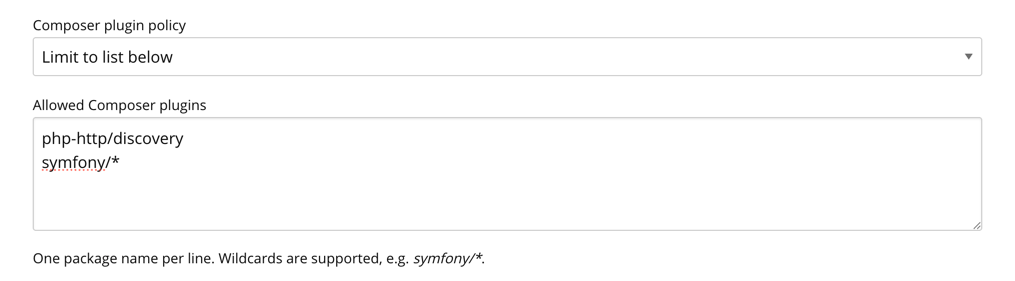
When Limit to list below is active and a developer runs composer update, Private Packagist omits versions that declare "type": "composer-plugin" from the metadata response for any package whose name is not on the allowlist. Composer never sees these versions and cannot resolve them as part of an update:
$❯ composer update
Loading composer repositories with package information
Updating dependencies
Your requirements could not be resolved to an installable set of packages.
  Problem 1
    - Root composer.json requires symfony/thanks, it could not be found in any version, there may be a typo in the package name.
A small UX caveat: The error message says the package "could not be found," which is technically accurate from Composer's perspective (no installable version remains after the plugin versions are filtered out), but it does not point at the real reason. If you see this error after enabling the allowlist, the package is almost always a plugin that has not been allowlisted, not a typo.
Pre-existing lock files
The composer update filtering does not change anything for projects installing from an existing lock file. The lock file already records a specific dist URL for the plugin version, and a composer install will download from that URL directly without consulting the metadata where the plugin would now be missing.
A second setting, “Composer plugin behavior on existing lock files” prevents this behavior:
- Prevent download: Private Packagist returns an HTTP 410 error response when Composer tries to download a dist file for a plugin version that is not on the allowlist, even for installs from an existing lock file.
- Allow download: dist files for all plugins are served normally, even if they are not on the allowlist. This is the default, both for new and existing organizations, since enabling Prevent download without first allowlisting your existing plugins will fail the next deploy.
Once Limit to list below is configured and you have verified that all the plugins your projects actually need are on the allowlist, flipping the second setting to Prevent download closes the lock file install path, too.
Closing Composer's fallback paths
If you have already read the previous posts in this series, the rest of this is familiar. Private Packagist serving a 410 error for a plugin dist file is only the end of the story if Composer cannot quietly obtain the same file from somewhere else, e.g. the underlying public GitHub repository for a package mirrored from Packagist.org. So you need to use two existing settings to make the error result for downloads effective:
- Legacy insecure package download fallback must be disabled, so upstream dist URLs are stripped from package metadata.
- Hide source code checkout URLs from Composer should be enabled, so even older Composer clients have no source repository to fall back to.
Both settings are covered in detail in closing Composer's download fallback paths. Combined with the plugin allowlist, the result is that non-allowlisted plugins cannot reach your developers' machines, AI agents’ sandboxes or your CI runners regardless of which Composer version or configuration is in use.
Plugins used as regular libraries
Some packages, such as php-http/discovery, declare themselves as plugins but are commonly used as regular library dependencies as well. To use them at all with "Limit to list below" selected, you still need to allowlist these packages on Private Packagist, otherwise their versions are filtered out entirely and projects that depend on them as libraries cannot install them either.
Allowlisting on Private Packagist controls availability across the organization. Whether the plugin actually executes is still up to each project's local allow-plugins configuration. So a project can pull in php-http/discovery as a regular library, with the plugin behavior disabled locally, while the package is broadly allowlisted at the organization level.
Getting started with organization-wide plugin control
Open Settings > Security in your organization and switch Composer Plugins to Limit to list below. The settings page suggests the plugin packages currently in use across your organization as a starting point. Review them and add anything else you knowingly rely on.
Keep Allow download on while you verify that your existing lock files are covered, then switch to Prevent download once you are confident. A forgotten entry will surface as a failed deploy rather than a silent install, which is the failure mode you want, but it is still worth catching during a planned rollout rather than at 3am.
If you would like help working through the rollout, get in touch via contact@packagist.com or through the support chat.