What's New in Private Packagist, February 2026 Update

Private Packagist has continued to evolve over the past three months with significant improvements to authentication flows, security hardening, and notification capabilities. Here are the highlights from our latest round of product improvements.
Redesigned Login and Registration Flow
We've completely reworked the authentication experience to make login and registration more intuitive and accessible. The new flow replaces the modal-based authentication dialogs with dedicated pages that provide a clearer, more straightforward user journey.
Previously, switching between login and registration or email based authentication and OAuth could be very confusing. The new dedicated pages offer improved visual hierarchy, better guidance throughout the authentication process, and a significantly better experience on mobile devices.
Enhanced Multi-Factor Authentication Management
Security remains our top priority, and we've introduced several enhancements to strengthen account protection while making it easier for organization owners to help users with MFA issues.
Organization owners can now reset multi-factor authentication for members directly from the members page. This is particularly helpful when users lose access to their MFA devices and need assistance regaining access to their accounts.
We've also improved the security of MFA backup codes. Generating a new set of backup codes now invalidates all other active sessions, ensuring that if backup codes are compromised, any potential unauthorized access is immediately terminated.
Microsoft Teams Notification Channel Updates
Important: If you're using Microsoft Teams notification channels to receive notifications about package releases, security advisories, and abandoned packages, please migrate to our new Microsoft Teams (Workflow) notification channel before March 2026.
Microsoft is deprecating Office 365 Connectors in favor of Power Automate Workflows. To ensure you can continue receiving notifications in Microsoft Teams without interruption, we've introduced a new notification channel type "Microsoft Teams (Workflow)". The existing "Microsoft Teams" channel type has been renamed to "Microsoft Teams (deprecated)" to clearly indicate that it uses the older connector technology.
The migration process is straightforward: Go to the notification channels section in your organization's settings and create a new notification channel with type "Microsoft Teams (Workflow)." Trigger a test notification to validate your new notification channel and remove the old channel once done.
Improved Composer Search Integration
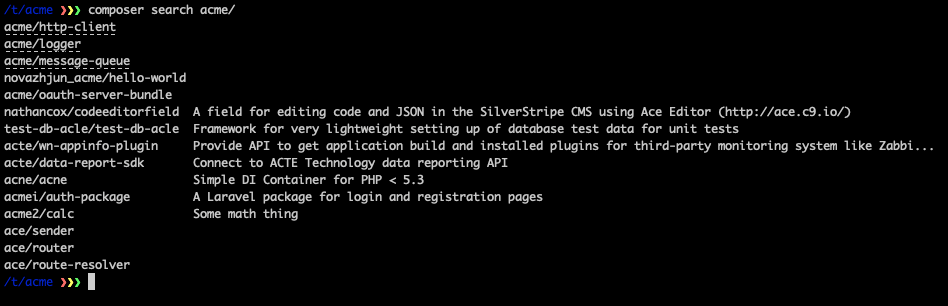
We've enhanced Composer search to include clickable package URLs in the results. When you run composer search acme, packages already in your Private Packagist organization now display as links you can click directly from your terminal to view detailed information.
General User Interface Improvements
We've started a broader initiative to clean up and modernize the Private Packagist user interface. Recent improvements include the already mentioned new login and registration flow, a refreshed members page with better organization and clarity, and standardized form rendering across the application for a more consistent experience. This is just the beginning. We have more UI enhancements in the pipeline that we're excited to share in future updates.
What Else Is New?
We've listed the most important changes here, but if you are looking for the full list of all changes and bug fixes, please take a look at our complete changelog.
If you have any questions or want to learn more about specific features, feel free to reach out to our support team at any time!
Sign Up for a Free Trial on packagist.com
Get access to multi packages for your monorepos and many more Composer tools like third-party package repository mirroring, security monitoring or separate Composer package repositories for clients.